
For the latest updates, see EPR Release Notices.
For EPR related videos, check out Digital Education's YouTube Channel.
For the latest updates, see EPR Release Notices.
For EPR related videos, check out Digital Education's YouTube Channel.
Behaviour Safety Alert
Covered in the topic:
Documenting a Behaviour Safety Alert
Removing a Behaviour Safety Alert
The Behaviour Safety Alert (BSA) is used to flag a patient with violent or aggressive behaviour.
Documenting a Behaviour Safety Alert
1. From the Patient Desktop, Patient Shortcuts menu, click Unscheduled Procedures.
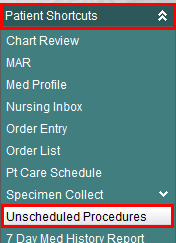
2. Select Behaviour Safety Alert from the list and click OK.
3. Enter the day / time the behaviour was observed or click OK to accept the default time of now.

4. Select Who exhibited the behaviour from the list and click OK.

5. Select a Behaviour Option from the list and click OK.
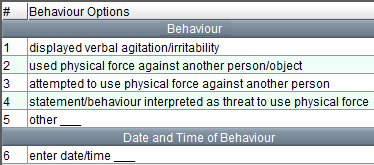
6. Select Contributing Factor from the list and click OK.
7. Enter free-text Management Strategies and click OK.
8. Choose an Incident Report option and click OK.
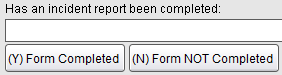
9. If an Internal Comment is required, choose Continue Editing and select the Internal Comment field. This information will appear in Chart Review but not on the on the Patient Dashboard. This is not a mandatory field.
10. Choose Accept to save your work.
The Behaviour Safety
Alert will now be found on the Patient Dashboard.
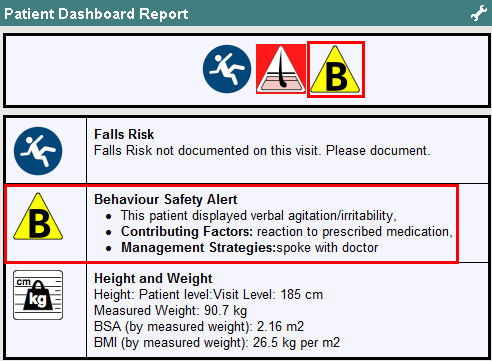
Removing a Behaviour Safety Alert
A behaviour safety alert flag can only be removed by a Manager, Advance Practicing Nurse (APNE), Most Responsible Physician (MRP) or Patient Care Coordinator (PCC).
1. From the Patient Desktop, Patient Shortcuts menu, click Unscheduled Procedures.
2. Select Behaviour Safety Alert - Removal from the list and click OK.
3. Enter the day and time you performed the unscheduled procedure or click OK to accept the default time of now.
4. Choose Remove Alert
and then choose Accept to save.
The Behaviour Safety Alert will no longer appear on the patient dashboard.
Note: Although the Behaviour Safety Alert is no longer on the Patient Dashboard, the historical information can still be found in Chart Review under Cautions.